

TravelingForMiles.com may receive commission from card issuers. Some or all of the card offers that appear on TravelingForMiles.com are from advertisers and may impact how and where card products appear on the site. TravelingForMiles.com does not include all card companies or all available card offers.
I’m a big fan of transferrable currencies like Amex Membership Rewards because they allow me to stockpile points for months on end without much risk, and I don’t have to move those points across to any individual loyalty program until I’m actually ready to use them.
The fact that I can also give my transferable currency balances a significant boost through good welcome offers probably has a lot to do with my love for them as well.
As far as some of my major spending goes, I use the Platinum Card® from American Express to purchase most of my air fares (it earns me 5 points/dollar on up to $500,000 of spending made directly with airlines or flights booked through Amex Travel and 1 point/dollar thereafter – terms apply), and I put most of my non-bonused spending on the Blue Business® Plus Credit Card from American Express (which earns me 2 points/dollar on the first $50,000 of eligible spending per year and 1 point/dollar thereafter – terms apply), and the reason these cards get so much use is because I can transfer the Membership Rewards points they earn to a wide variety of other loyalty programs.
That brings me on to the reason for this article – how to convert/transfer over Amex points to other loyalty programs.
The process is very simple, and it looks like this:
Convert Amex points to airline & hotel currencies
What you’ll need:
- Your login credentials for your American Express account associated with your Membership Rewards cards.
- One of your Membership Rewards cards.
- The account number for the loyalty program that you’ll be transferring your Amex points to (if you haven’t already linked this account with your Amex account).
Step 1 – Log in & get to the Membership Rewards page
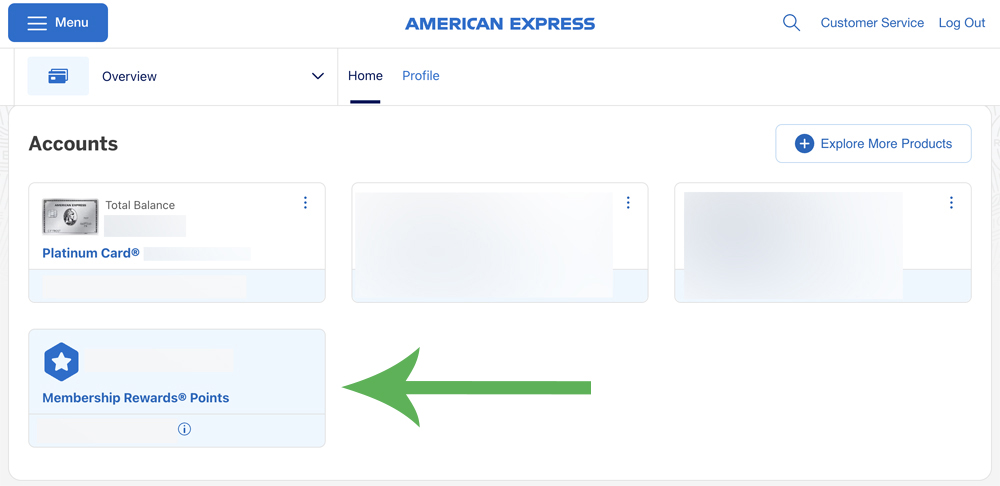
Log in to your Amex Membership Rewards account. This is the screen that you should see, and here click on your Membership Rewards total to take you to the main Membership Rewards page.
Step 2 – Get to the transfer points section
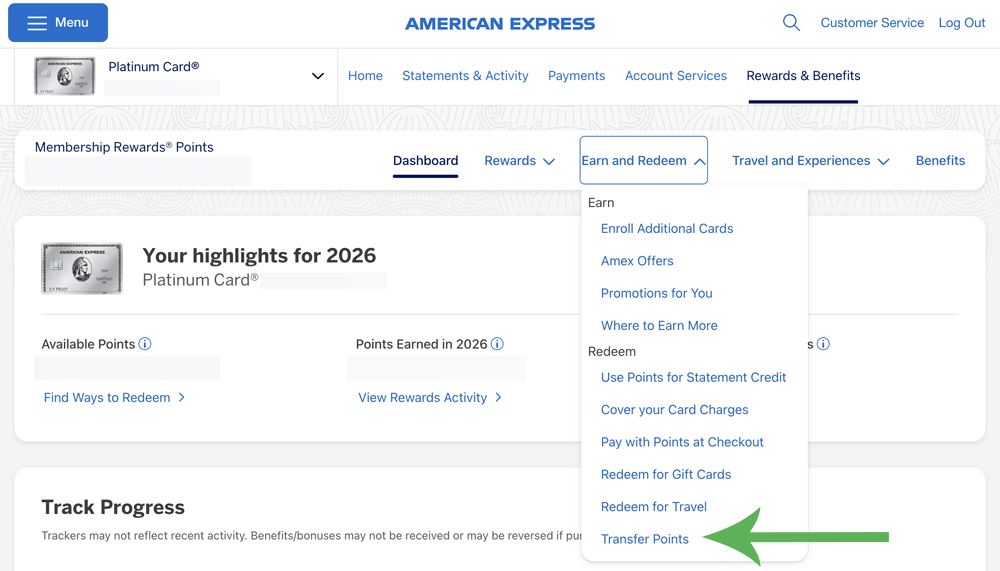
On the page that appears, click on the “Earn and Redeem” tab to open up your options …

… and now click on ‘Transfer Points’ from the dropdown menu that has appeared.
Step 3 – View your transfer options
On the page that has now opened, you should see all of the Membership Rewards loyalty partners listed out (you may have to scroll down the page).
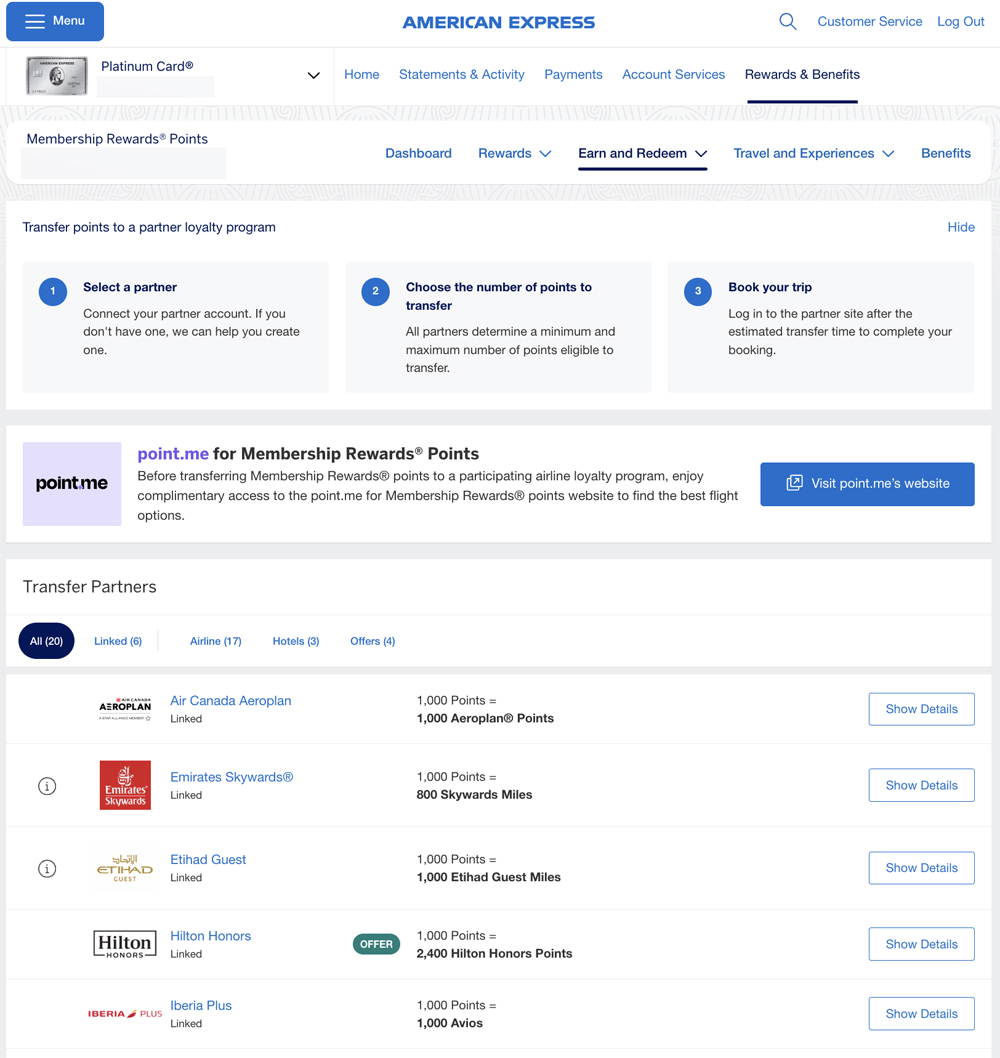
The transfer of points to one of these programs is simple, but if you haven’t yet linked your Amex account to the program to which you want to transfer points, you’ll have to do this first.
Click on the “show details button” next to the loyalty program to which you wish to transfer some points to get the linking process under way.
Step 4 – Link accounts (skip to step 6 if you have already linked)
If you haven’t yet linked your Amex account to your destination loyalty program, you’ll need to have the following close by:
- Your account number in the loyalty program to which you’re linking
- One of the Amex cards associated with the Membership Rewards account that you’re linking to a loyalty program.
After you clicked on the “show details” button next to your chosen loyalty partner, the option to link to that partner will appear (for the purposes of this example, I’m linking my Amex account to my Flying Blue account):
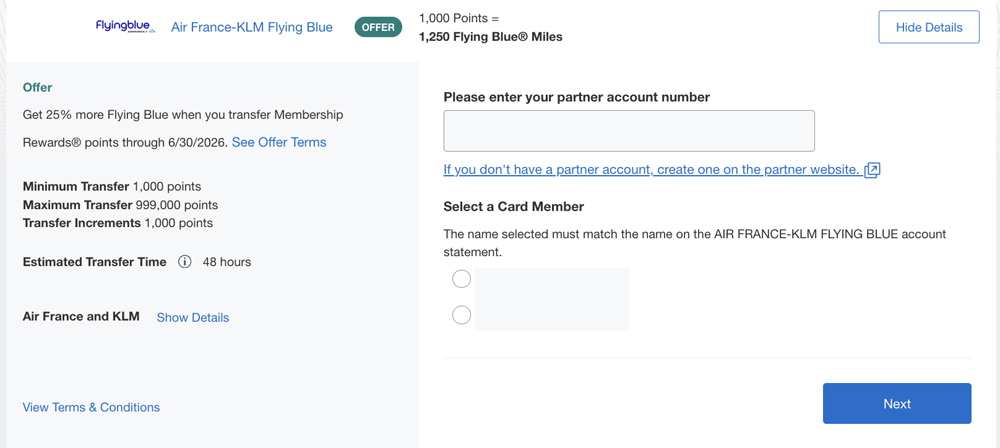
Enter your loyalty account number in the field provided and select the Amex card member whose name matches the one associated with the destination loyalty program and then click on ‘Next’.
Step 5 – Verify yourself
You will now be asked to verify your identity via (at the time of writing) one of five different ways.
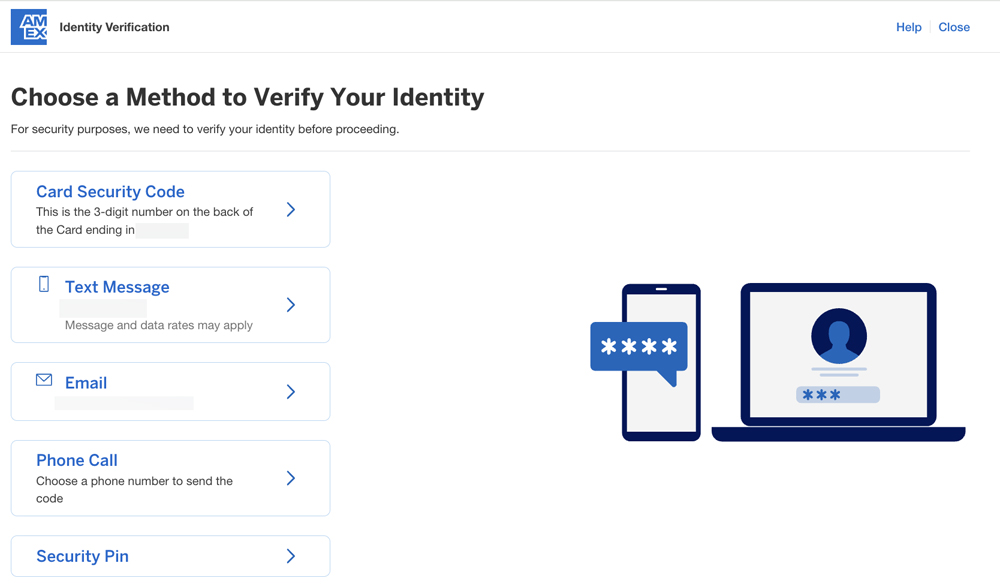
Choose the method you find simplest and proceed.
Assuming you have entered all the requested verification details correctly, you’ll now see a confirmation that your accounts are linked.
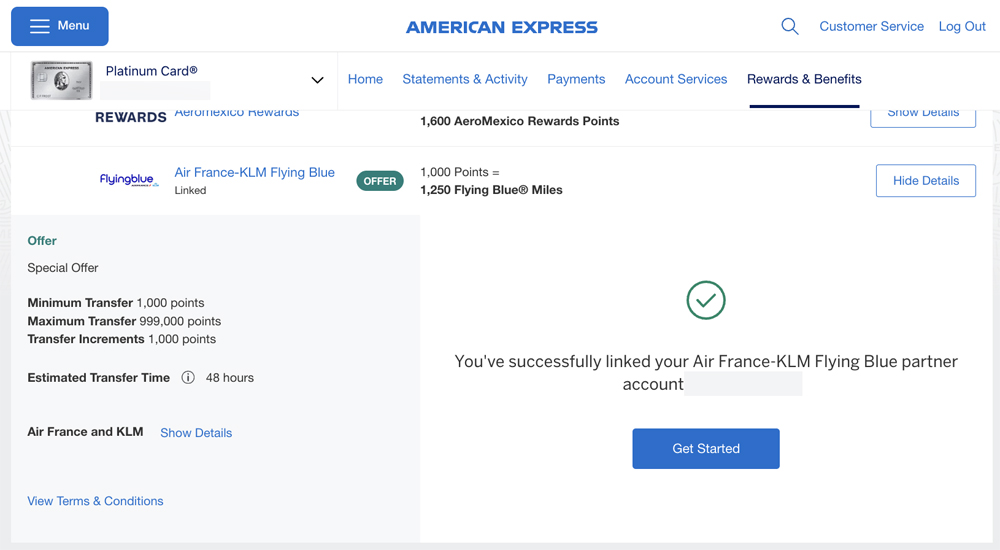
You should also receive a confirmation email.
Step 6 – Convert/transfer your points
If you have already linked your accounts (or once you’ve linked a new account and clicked ‘show details’), this is what you should be faced with:
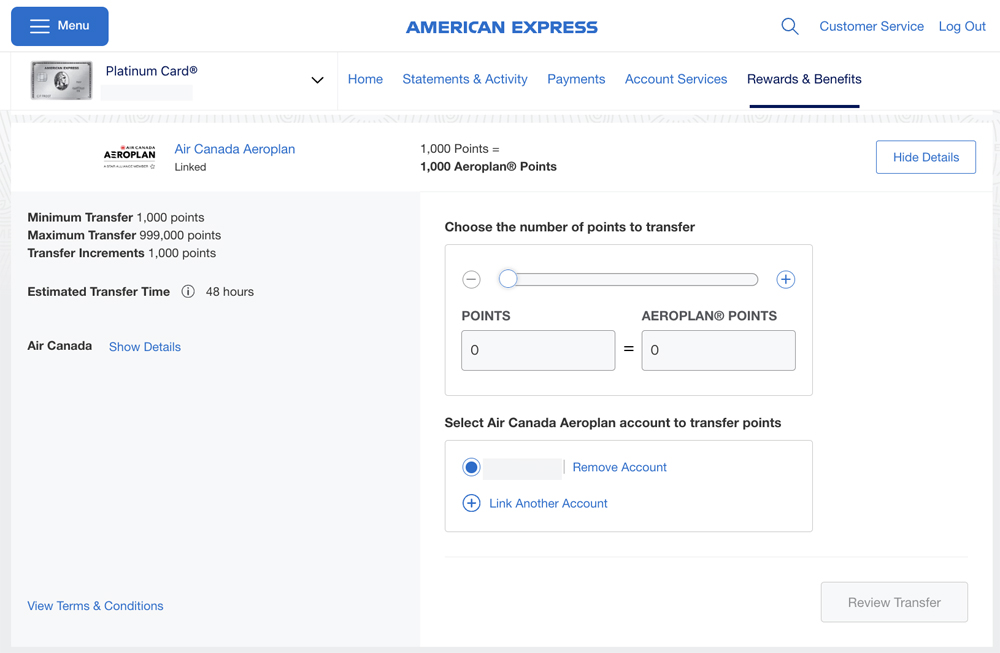
Check that your destination account details are correct before proceeding (if you have only just linked accounts, they’re unlikely to be wrong).
For the purposes of this example, I’m converting points to Aeroplan as I have no need for any more Flying Blue miles right now.
Now all you have to do is let Amex know how many points you would like to convert/transfer and in turn, Amex will automatically let you know how many points/miles you can expect to show up in at the other end of the transaction.
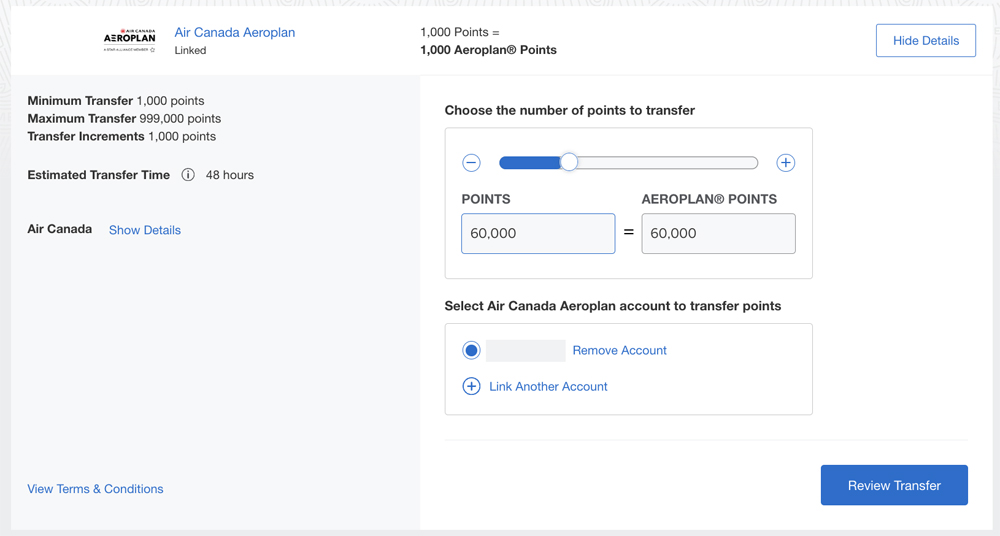
You can also choose to enter how many points/miles you’d like to generate, and Amex will automatically work out how many Amex points you will need.
After making sure that you’re comfortable with the number of points that you’re transferring out and the number of points/miles that you’re generating, click on the ‘Review Transfer’ button.
Step 7 – Review the transfer and verify your identity again
The next page you see will be a summary page showing you what transfer you’ve just requested …
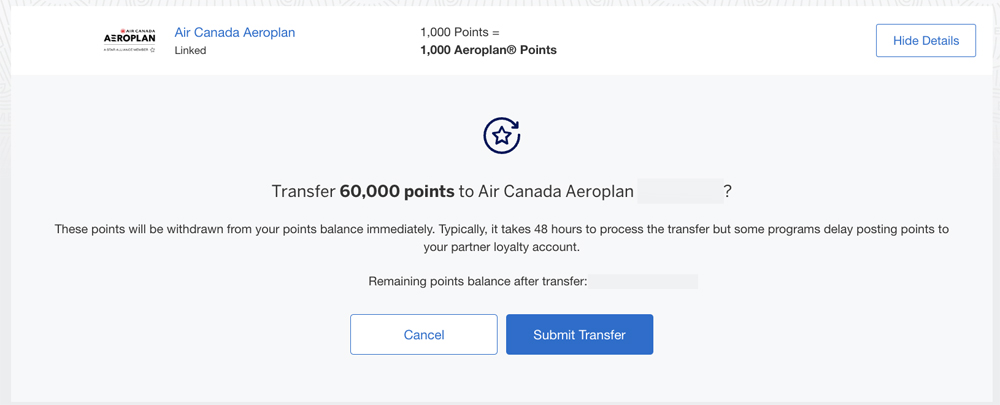
… and if you’re comfortable that all the details are correct you can now submit the transfer.
As soon as you submit the transfer, you’ll be asked to verify your identity once again and this time, you’ll have to use a different verification method to the one you used earlier (that method will not appear as an option).
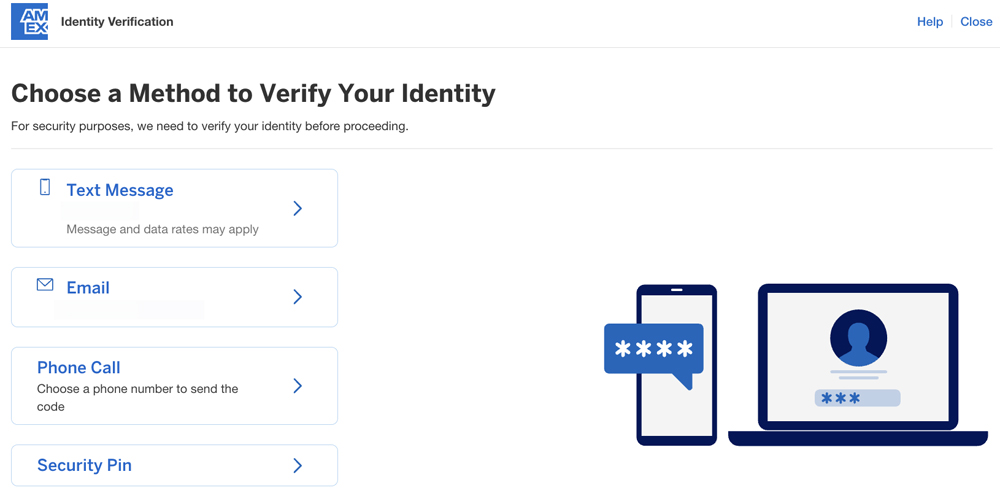
Once you have passed this second verification, you’ll see an on-screen confirmation that the transfer has been enacted.
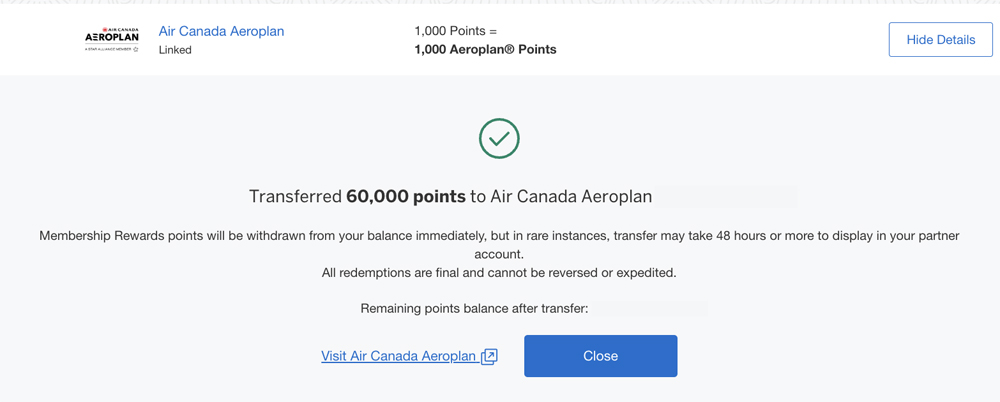
You should also receive an email confirmation.
Step 8 – Check the points/miles have arrived
Most transfer from Amex to a loyalty partner are instantaneous (even if Amex covers itself by telling you that your transfer can take up to 48 hours), so at this point it’s always good to head over to the account in which you’re expecting some miles/points to turn up to see if they have arrived.
In the case of this transfer, the 60,000 Air Canada Aeroplan Points that I generated were waiting for me in my Aeroplan account the moment I logged in.
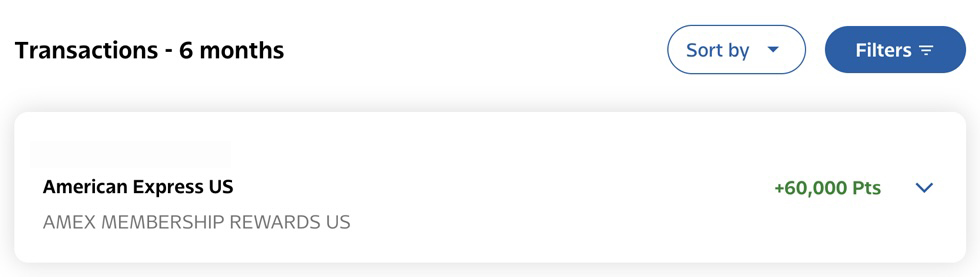
Some transfers can take longer, and you can see the expected wait times in this article.
Final Thoughts
Linking a loyalty program to your Membership Rewards account and transferring points out is a straightforward process, and with Membership Rewards points being very easy to earn, that combination makes them a great currency to collect for fans of the miles & points game.